Kettle app icon
Kettle

Tell Siri to boil the kettle.

Kettle is a free app for Redmond SkyKettle smart kettles. It adds Siri and Shortcuts voice commands, and lets you set the light colour, sound, boiling time and temperature. It talks to the kettle over Bluetooth: no cloud, no account.

See it in action
  • iPhone
  • iPad
  • Mac with Apple silicon
  • Apple Vision Pro
  • Free
  • No account
  • Coming to the App Store

What it does

Say it, don’t tap it

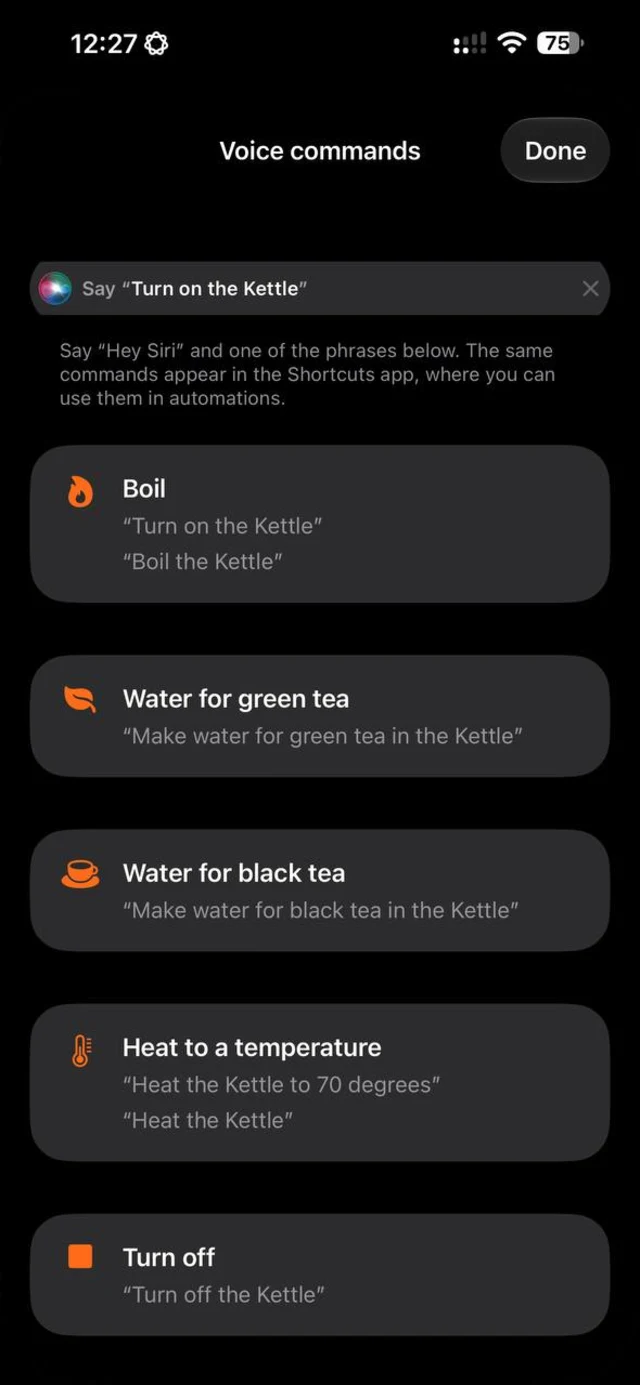
“Turn on the Kettle”, “Make water for green tea in the Kettle”, “Heat the Kettle to 70 degrees”. Siri and Shortcuts run the command without opening the app, so it works from the lock screen, a HomePod or the Apple Watch.

The app name is part of every phrase, which is how Siri knows which app you mean.

The right temperature for tea

Green tea heats the water to 80 °C, black tea boils it. For anything else, heat to 40, 50, 60, 70, 80 or 90 degrees, or ask Siri to heat the kettle and say the number.

The kettle, set up your way

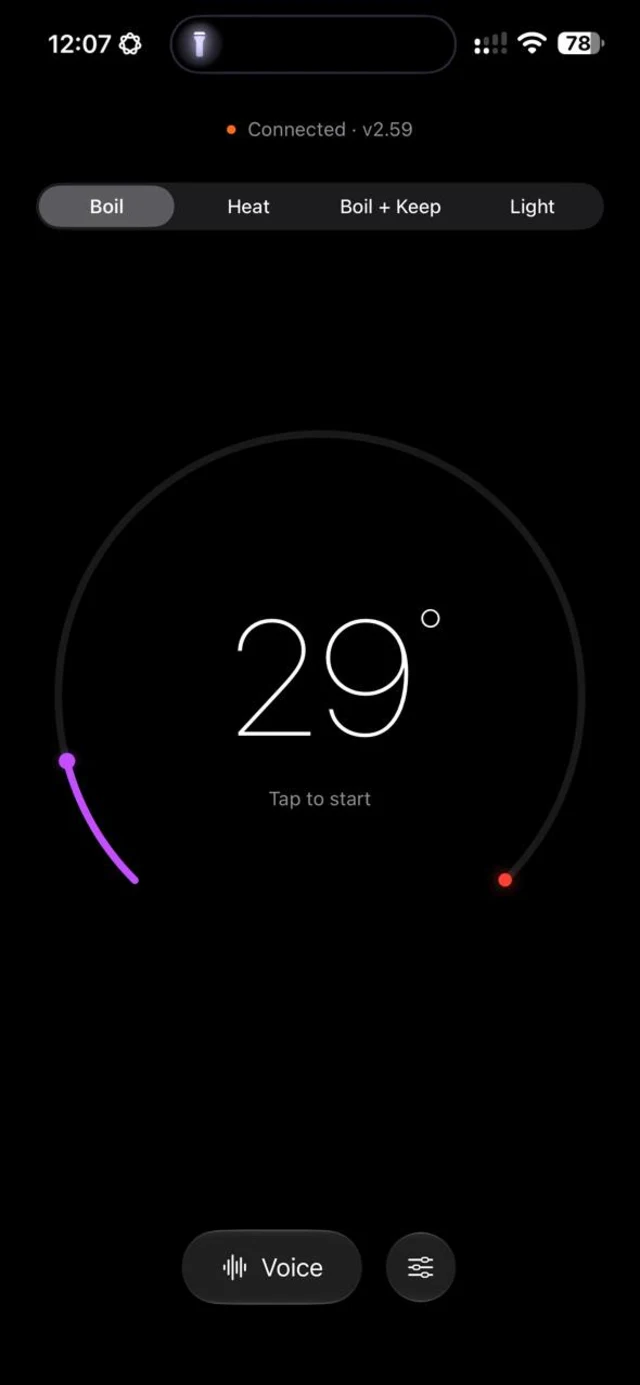
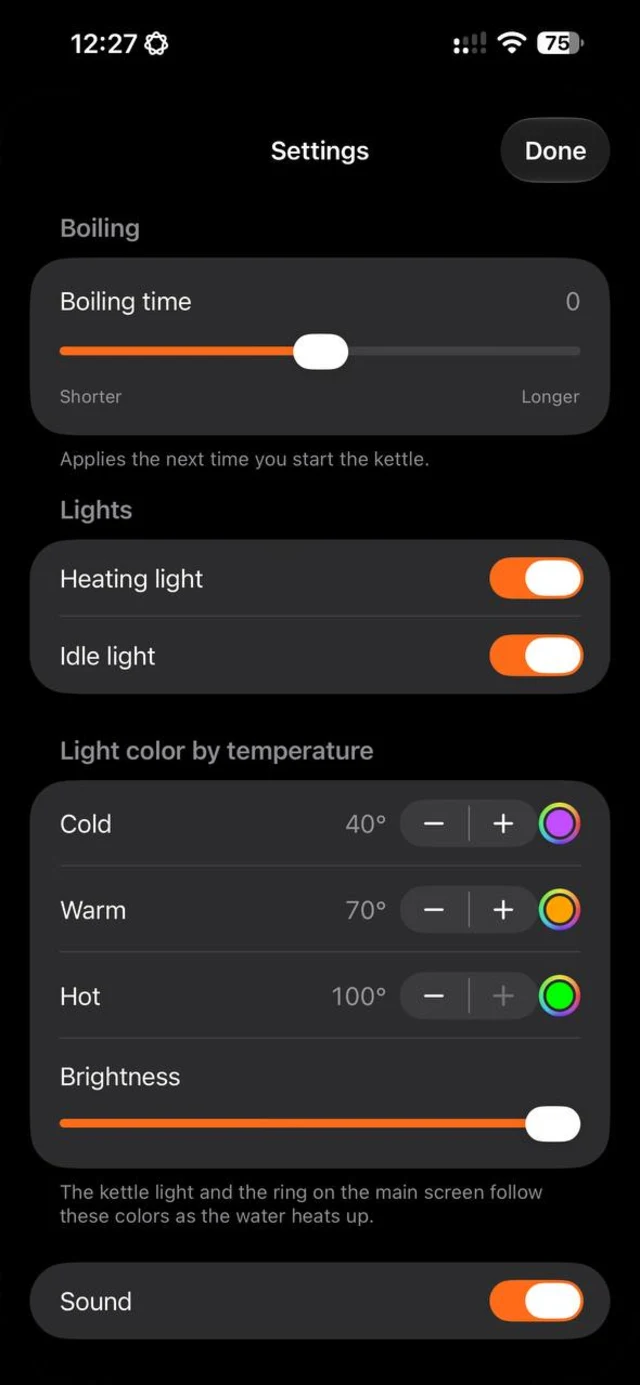
Pick the light colour for cold, warm and hot water and set its brightness, switch the heating light and the idle light on or off, turn the beep off, and lengthen or shorten the boil. The ring on the main screen follows the same colours as the water heats.

Private by design

The app talks to the kettle over Bluetooth and nothing else. There is no cloud, no account, no analytics and no tracking.

Read the privacy policy

See it in action

The Kettle main screen on an iPhone in dark mode, in Boil mode with the water at 29 degrees and a colour ring that fills as the water heats.
The main screen: the ring fills with the colours of the water as it heats.
The Voice commands screen on an iPhone in dark mode, listing the Siri phrases for boiling, water for green and black tea, heating to a temperature and turning off.
Every Siri phrase in one list.
The Settings screen on an iPhone in dark mode with boiling time, heating and idle lights, light colour for cold, warm and hot water, brightness and sound.
Light colours, boiling time and sound.

Screenshots from an iPhone in dark mode. The app also follows light mode.

Siri phrases

Boil
“Turn on the Kettle”, “Boil the Kettle”
Water for tea
“Make water for green tea in the Kettle”, “Make water for black tea in the Kettle”
Heat to a temperature
“Heat the Kettle to 70 degrees”, or “Heat the Kettle” and Siri asks for the number
Turn off
“Turn off the Kettle”, “Stop the Kettle”
Night light
“Turn on the Kettle night light”
Temperature
“How hot is the Kettle”

Details

Works with
Redmond SkyKettle kettles of the RK-G2xxS family. Tested on the RK-G212S.
Connection
Bluetooth LE, straight from your device to the kettle. No cloud, no account.
Voice
Siri and the Shortcuts app, including automations. Commands run without opening the app.
Controls
Boil, heat to a temperature, boil and keep warm, night light, boiling time, light colours by temperature, brightness, sound.
Price
Free.
Works on
iPhone, iPad and Mac with Apple silicon. Should also run on Apple Vision Pro as an iPhone and iPad app.
Languages
English and Russian. Siri phrases follow the language of the device.
Privacy
No data is collected. No analytics or tracking SDK.

Kettle is an independent app by 278labs. It is not made, sponsored or endorsed by Redmond. Redmond and SkyKettle are trademarks of their owners.